
Stopwatch
Lap & Split Timer with voice
Download on the App Store
Free to use. PRO is one purchase, no subscription.
Using Stopwatch Lite? It is here.

Read it from across the track. Hear it without looking.
Huge, crisp digits you can read at arm's length, every lap with a single tap, and your splits read out loud, even with the phone locked in your pocket. Build profiles for every workout with events that speak, beep or vibrate: "Split" every minute, "Halfway" at 5 km, a bell at the end. Every run is saved to history with its laps, best, worst and average, and the next one is measured against it: see at a glance whether you are ahead of your best or your last.


Top Features
Built for training, from the track to the pool
-
Huge digits
Readable at arm's length, and even bigger when you turn the phone sideways.
-
Profiles and events
Events speak, beep or vibrate at a set time, once or repeating, from the start or from the lap.
-
History
Every run with its laps, best, worst and average. Share results as text.
-
Voice announcer
Hear the event name, elapsed time and lap time in your language, even with the screen locked.
-
149 sounds
Bells, beeps and ticks every second, plus vibration, so you can train by ear.
-
Lock Screen and widgets
A Live Activity with Lap and Start/Stop on the Lock Screen and in the Dynamic Island, and widgets on the Home and Lock Screen with the same buttons.


Even bigger sideways
Turn the phone and the time fills the screen, readable from across the room.

On your wrist
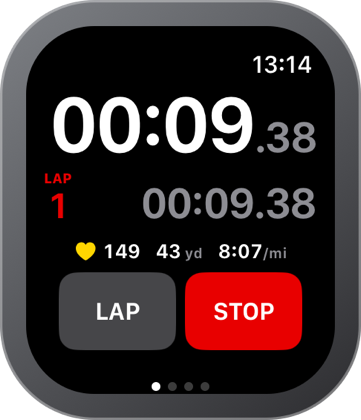
The whole stopwatch on Apple Watch, with or without the iPhone.
-
Start without the phone
Pick a profile and run the stopwatch on the watch alone. The run lands in History on your iPhone by itself.
-
Heart rate and zones
Your heart rate through the run and for every lap, with the zone it was in, saved as a workout in Health.
-
Distance, pace and route
GPS on the watch gives distance and pace while you run, a lap every kilometer if you want one, and the route on a map afterwards.
-
The phone’s run on the wrist
A stopwatch started on the iPhone shows up on the watch, with Lap and Stop where your hand already is.
Always within reach
-
Start from Control Center
Start the stopwatch from Control Center, even before the app is open.
-
Widgets
The running time with its lap on the Home Screen and the Lock Screen, and Lap and Stop right on the widget.
-
Auto-lock
Pocket taps can't stop your run; swipe to unlock.
-
Keeps running
Leave the app or restart the phone: your run is still there.


-
iPhone and iPad
A layout made for each, in light and dark mode.
-
Beat your last run
Compare with your last, best or worst run: the time to beat, every lap’s difference and how far along you are.
-
Interval workouts
Work and rest rounds that count themselves down, speak and tap your wrist, with splits and a goal per split.
-
16 colors, 4 styles
Make the clock yours. Left-handed? Swap the Start and Lap buttons.
-
iCloud sync with PRO
Profiles and history on all your devices. One purchase, no subscription, no ads.
-
Private
No account, no sign-up. Your data stays on your device.


Screenshots


